One wallet, several counters
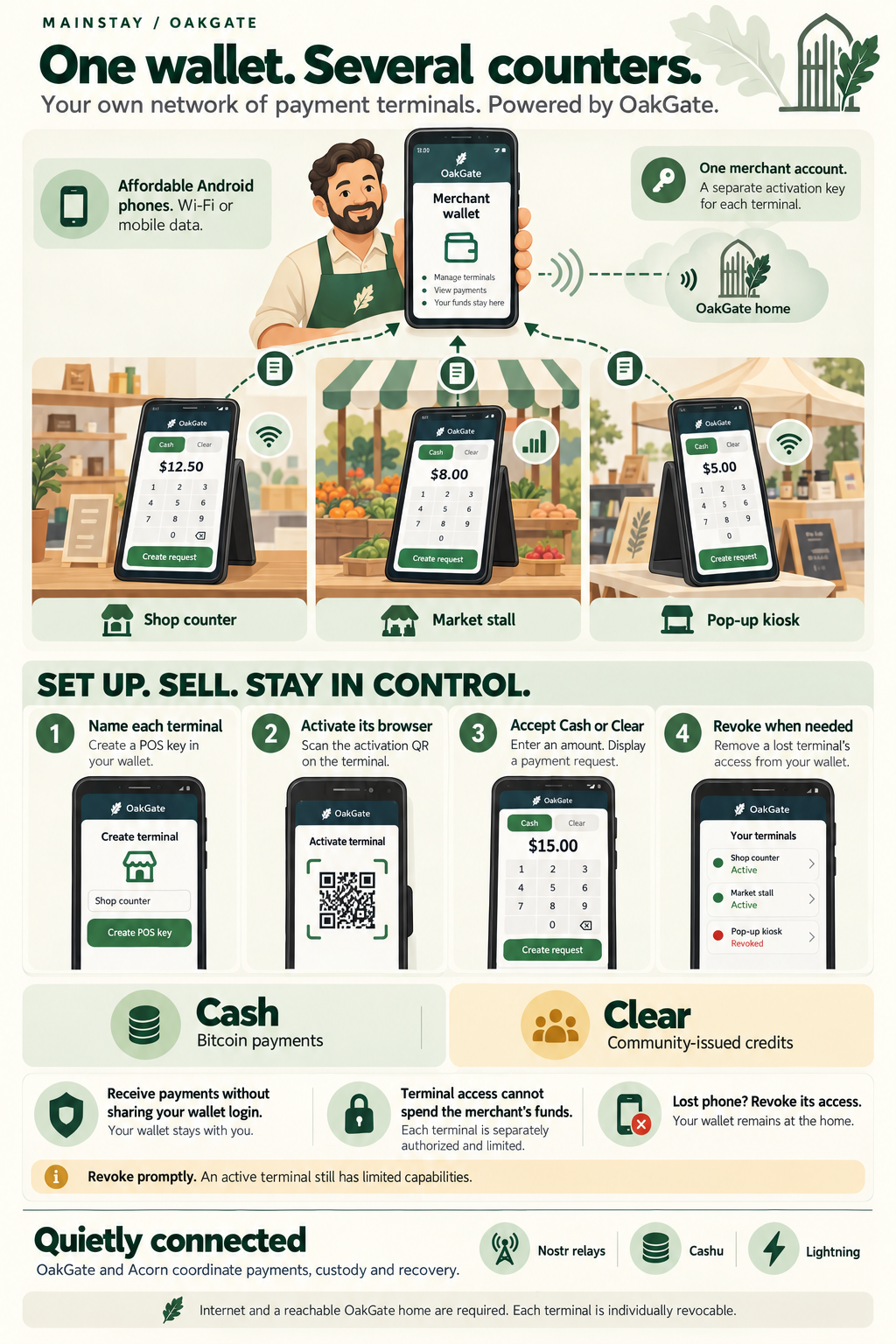
Open the full-size infographic
Illustrated screens explain the experience; they are not exact application screenshots.
Sam runs a small neighbourhood shop. On Saturdays, one colleague takes a stall at the farmers' market while another sells at a nearby pop-up kiosk. Sam wants all three counters to accept payments into the same merchant wallet, without sharing his wallet login with the staff.
He already uses OakGate. For the counters, he buys three inexpensive Android phones with current browser and security support. The shop phone uses Wi-Fi; the market phones use mobile data or a reliable hotspot. Each opens the OakGate POS website. None needs to hold his wallet private key.
Sam and his shop are illustrative; this story follows the current POS workflow.
Three phones, one merchant wallet
In his wallet's Preferences, Sam creates a separate POS key for each device and gives it a useful name: Shop counter, Market stall, and Pop-up kiosk. On each terminal, he scans that terminal's activation QR code from his wallet. Activation binds its credential to that browser.
The phones now show a payment keypad. Staff can choose Cash or an available Clear asset, enter the amount, and display a request for the customer. They do not need Sam's Google or email login, his recovery phrase, or access to his Funds page. Sam keeps account administration on his own device.
Everyday Funds at the shop, Community Credits at the market
At the shop, a customer buys a loaf of bread. The cashier selects Cash and enters the price in local currency. OakGate shows the satoshi amount used to generate the invoice. The customer scans the payment QR with a compatible wallet.
At the market, another customer pays using Community Credits, backed by a community-issued Clear asset. The staff member selects the matching Clear balance and enters a whole-number amount in that credit's units. Cash and Clear stay distinct: community credits are not automatically converted to bitcoin or treated as having the same value.
The terminals show payment progress. Payment detected is an early indication; final credit may follow in the background. Sam can check the resulting transactions in his wallet. Receipts from all three locations go to that same Acorn.
For customers with a suitable OakGate card, an NFC-capable Android terminal can also offer Pay by NFC. The current card-payment flow is limited to the same OakGate home and does not request a payment PIN. QR receiving does not require NFC hardware. See the card experience.
One terminal for payments and record checks
At the community market, Sam's staff can also request a record without opening his wallet. They switch from Point of Sale to Check a Record, choose whoami or myinfo, and select Create Request.
A customer scans the request and approves in their OakGate wallet, or presents
a card from a participating home when staff select Request by NFC. Staff then choose
Show Record to see the text, supported image attachment and available
OpenETR verification information. The customer decides what to keep in these
records: whoami for the information they use to introduce themselves, and
myinfo for additional information they wish to present.
Starting the next request clears the previous customer's display. Staff can also select Close Request; requests expire after two minutes. The terminal views a temporary presentation rather than adding the record to Sam's Acorn. Staff must still judge whether the evidence meets their needs—record presentation is not automatic identity verification or permission to enter an event.
Existing activated terminals can use this feature after both the app and POS are updated. They do not need new activation keys.
A missing terminal does not mean a missing wallet
At closing time, the pop-up phone cannot be found. Sam opens Preferences on his own phone, finds Pop-up kiosk, and revokes it. OakGate rejects further authorized terminal operations from that device. The other two terminals remain active, and the missing phone's credential does not authorize spending Sam's funds.
Revocation does not undo payments already submitted or invalidate every request already copied by a customer. Those payments still need normal status checks and settlement. Sam replaces the phone, creates a new terminal credential and activates the new browser; he does not need to replace his wallet.
His terminals, shared infrastructure
Sam has his own network of payment terminals: he chooses their names, who uses them and when their access ends. He can use an existing OakGate home operated by a provider; he does not need to run a separate home or server for each kiosk.
This is private in the sense of controlled terminal access. It is not a claim of anonymous payments, private settlement rails or independence from the home operator. OakGate coordinates custody and recovery, and Acorn performs wallet operations. Nostr relays, Cashu and Lightning work underneath the relevant payment flows. Blossom supports attachments and media in the wider record experience, rather than being a required step in each checkout.
What the protection means
The POS session does not contain Sam's custody keys or grant his account login or general spending access. A lost device therefore has a smaller scope of access than an unlocked merchant wallet. It should still be revoked promptly.
Today's POS also offers card issuance, confirmed card-balance lookups and
customer-card-authorized payment collection, and whoami/myinfo record
presentations through QR approval or a card tap. NFC record requests do not ask
for a PIN, so a lost or copied card can expose those records at an authorized
terminal until revoked. These are additional limited
capabilities: describing the device as completely harmless or incapable of any
data access would be misleading. Protect activation credentials, use a device
screen lock, and do not leave the merchant's signed-in wallet open on a staff POS.
Each device needs internet access and a reachable OakGate home. This is not an offline checkout system. Clear receiving requires the intended asset to be available to the merchant and compatible funding in the customer's wallet. Current provisioning allows up to ten unrevoked terminals per wallet; larger rollouts need operator review rather than a promise of unlimited devices.
POS setup and activation · Card payment details · POS record presentation · Explore User Experiences
Terminology: Everyday Funds means Cash; Community Credits means Clear balances. Some illustrations and payment controls retain Cash/Clear. See user-facing language.
Across participating homes
The wallet and terminal can belong to independent OakGate homes. The terminal stays with its own home, which verifies and contacts the card issuer for the requested operation. The holder does not need a second account at the merchant's home. Acceptance policies, compatible credit assets and online connectivity still apply; card issuance remains home-local; record QR approval also works between participating homes. See Independent homes, one connected experience.